Case study · Sep 2026
An AI assistant that actually knows the business it's on
Timeline
Sep 18–24, 2026, ongoing
Team
Solo
Status
Live in production
Stack
Next.js · TypeScript · OpenAI · Redis · Stripe
Challenge
Small businesses want an AI assistant that actually knows their business — not a generic chatbot that hallucinates, and not a custom build that needs an engineering team they don't have. And even a good one is worthless if it takes more than an afternoon to put on a real website.
Solution
A widget any business installs with one script tag, grounded only in their own catalogue and content, built and shipped solo by directing an AI coding agent through every product, design, and architecture decision.
Outcome
Live in production in about a week — priced, multi-tenant, and already running on a real install that surfaced two genuine product gaps within a day of watching someone actually use it.

Context
A chat widget that actually knows the business it's on
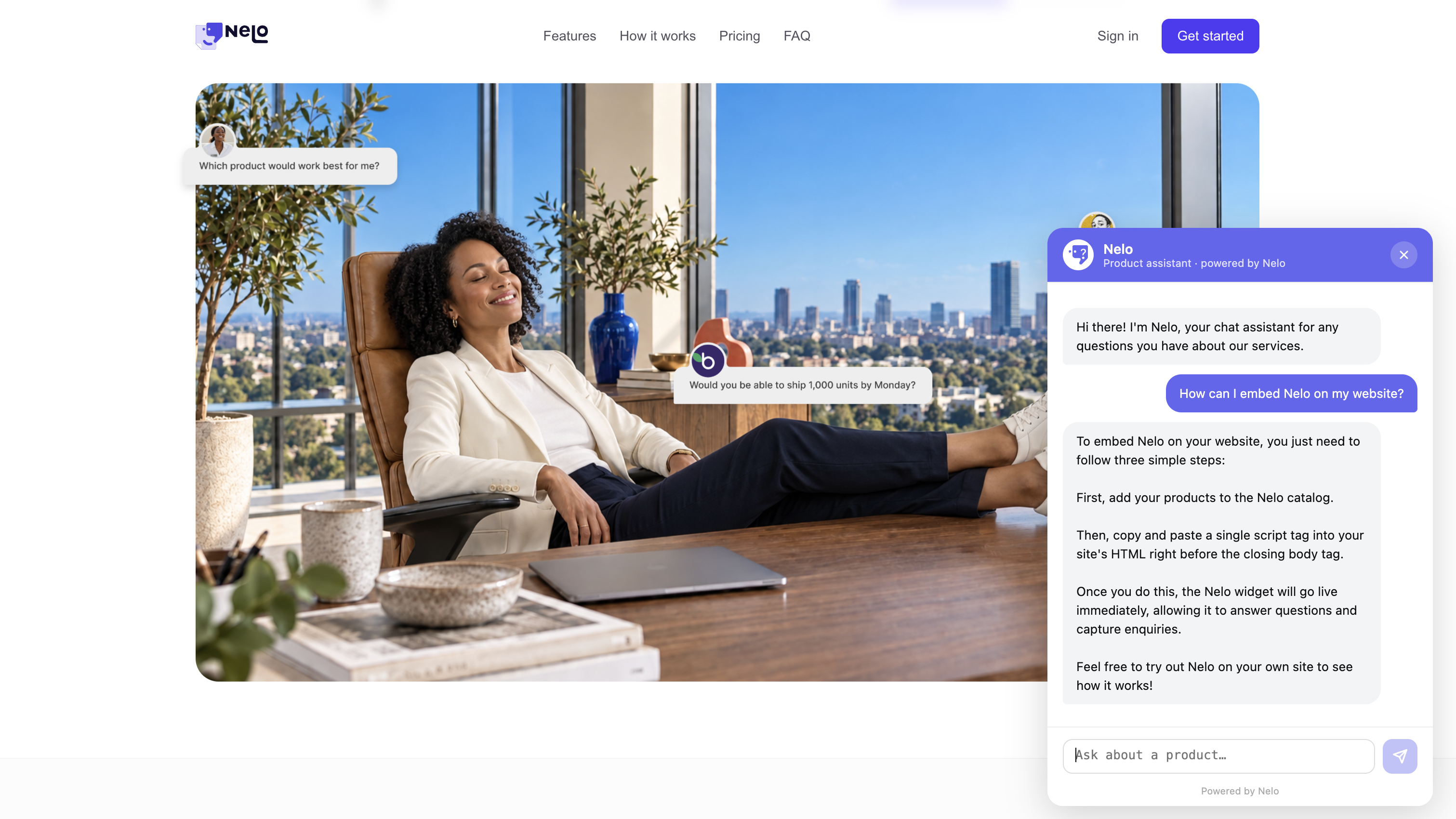
Most small businesses that want an “AI assistant” on their site are choosing between two bad options: a generic chatbot that hallucinates answers about their products, or a custom build that needs an engineering team they don't have. Nelo is the middle path — a widget a business owner installs in minutes, that answers only from their own catalogue and documents, never invents a discount or a fact, and hands off to a human the moment it's out of its depth.
Four decisions ended up shaping everything else: how a business actually puts this on their website, how the AI decides what to say and how to say it, how a business teaches it anything about itself in the first place, and what happens when someone tries to abuse it. I made every one of those calls myself, then directed an AI coding agent to build, test, and ship the result — the same loop whether the decision was a product call, a design call, or an architecture call.
The problems
Four decisions everything else depended on
These weren't implementation details — get any one of them wrong and the product doesn't work, no matter how good the model answering questions is.
Distribution — Getting onto someone else's website
A business isn't going to hire a developer to add a chat widget, so the entire install had to be one script tag — no build step, and no way for it to touch the host page's own styles. That constraint set the architecture: the widget lives in an iframe and only ever talks to the host page through postMessage, and it exposes one small public API — window.Nelo.open() — so a business's own buttons can open the widget and hand it a specific set of starter questions. Getting the handshake right mattered more than it sounds: the iframe has to tell the host page it's actually ready before the host page can safely talk to it, or the first click right after the page loads silently does nothing.
AI & conversation — Being useful without sounding automated
Every reply sits on a tension: say everything correct and you get a hedge-everything wall of text nobody wants to read; sound warm and brief and you risk skipping the one detail that actually mattered. A couple of small rules close most of that gap — replies break into short paragraphs instead of one dense block, and they type out at a pace just ahead of normal reading speed instead of dumping instantly, so the assistant feels present without making anyone wait.
But the harder version of this problem isn't tone, it's action. The only place Nelo had ever captured a visitor's contact details was a retail-only “email me when it's back in stock” flow, so for any business outside retail, a visitor who wanted to be connected or followed up with had no real way to leave their details — at best the assistant could recite the business's own contact information back to them, which isn't the same as capturing a lead. I generalised that mechanic into an industry-agnostic handover the AI is structurally required to trigger — not just describe in words — the moment a visitor wants to be connected.
Sounding helpful and doing the useful thing turned out to be two different features. I had to design for both, separately.
Architecture — Teaching an AI about a business it's never seen
The hardest architecture problem wasn't the model — it was designing how a non-technical owner hands their AI everything it needs to know, without turning them into a prompt engineer. Three layers do this: a structured catalogue (products, specs, stock status, with CSV import/export so switching from a spreadsheet is a five-minute job), free-text context documents for whatever doesn't fit a product row (policies, FAQs, a résumé), and an industry preset that seeds sensible default instructions the owner can then edit in plain English. All three get reassembled into the system prompt fresh on every request, so a catalogue edit takes effect on the very next message — nothing to redeploy.
That design worked well right up until a tenant had no product catalogue at all — a personal site, a services business. The very first thing a visitor sees, the greeting and the sample questions, had never actually been generated from that context; it was templated, and the template only knew about products. The fix was making that first impression get generated the same way every real answer already was — from the tenant's own content, cached and only regenerated when that content changes. For a personal website, that meant tuning the questions toward skills and experience rather than narrated biography, since the visitor asking them is usually sizing someone up for a role, not reading a memoir.
The hardest architecture problem was never the model. It was designing how someone who's never touched a CMS teaches an AI everything it needs to know.
Security — The key is public, on purpose — plan for it
Nelo's embed key is public by design, sitting in plain HTML on every customer's site, the same way a Stripe publishable key or a Google Maps key is. That's normal, but it also means anyone can copy it and hit the chat API directly — running up a business's own OpenAI bill, or scraping their catalogue. I audited how comparable products handle this and designed a layered defence rather than a single fix: per-IP rate limiting on the chat endpoint, binding a key's traffic to the domains it's actually embedded on, and a hard per-tenant spend cap so the worst case stays bounded no matter what gets past the first two layers.
What we built
Four surfaces, one product
Each one exists because of one of the problems above — none of it is generic SaaS scaffolding.
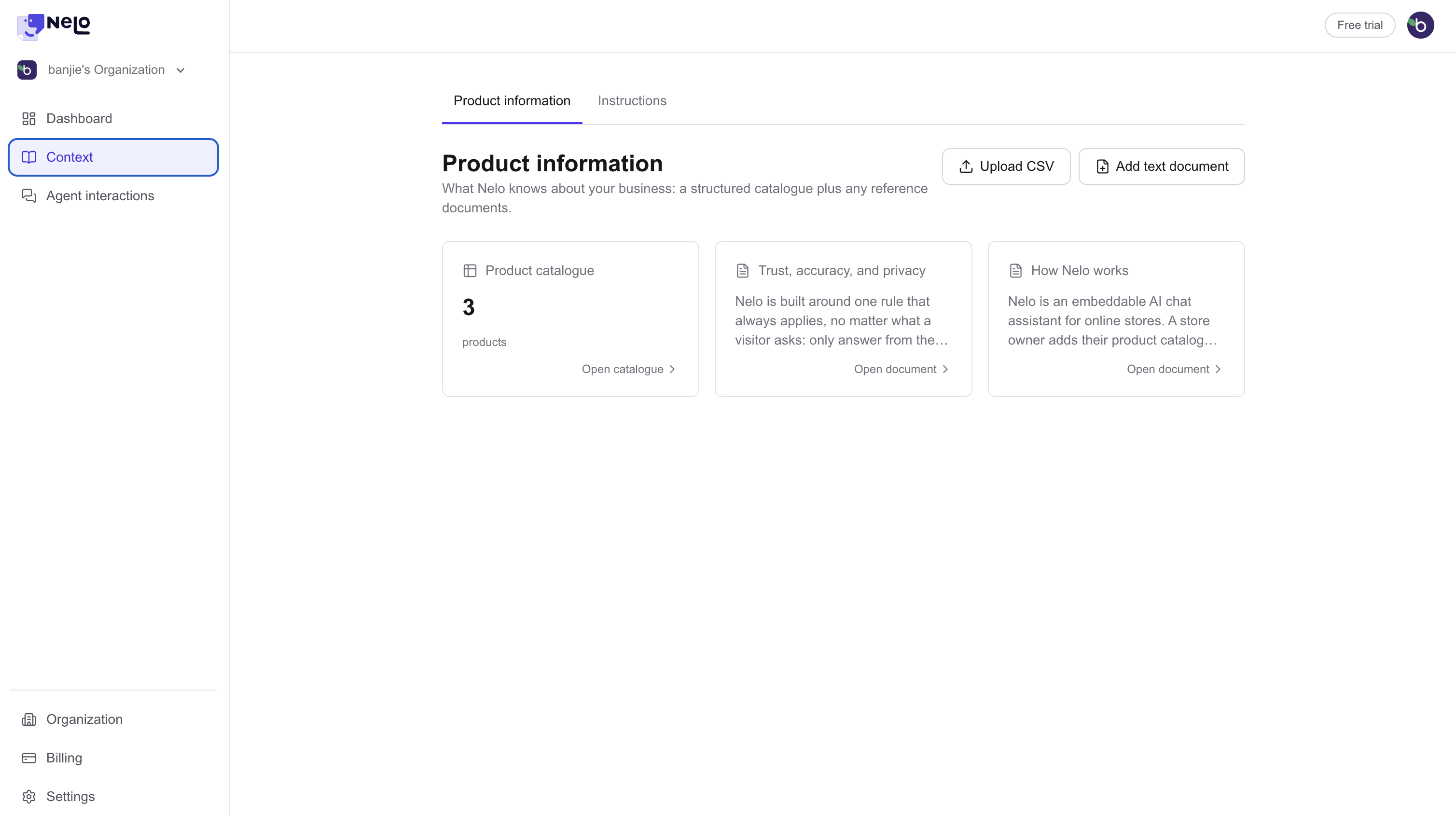
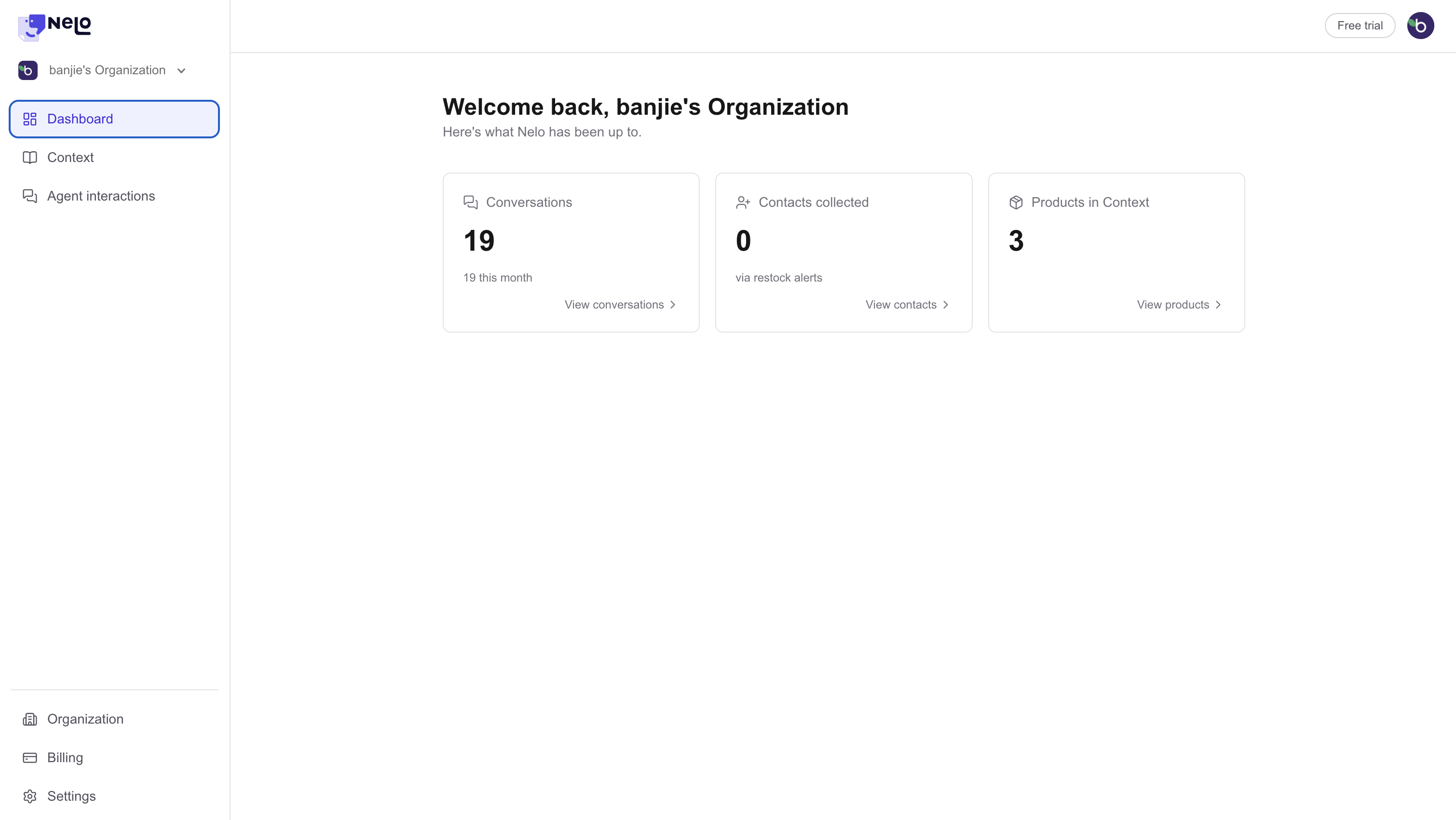
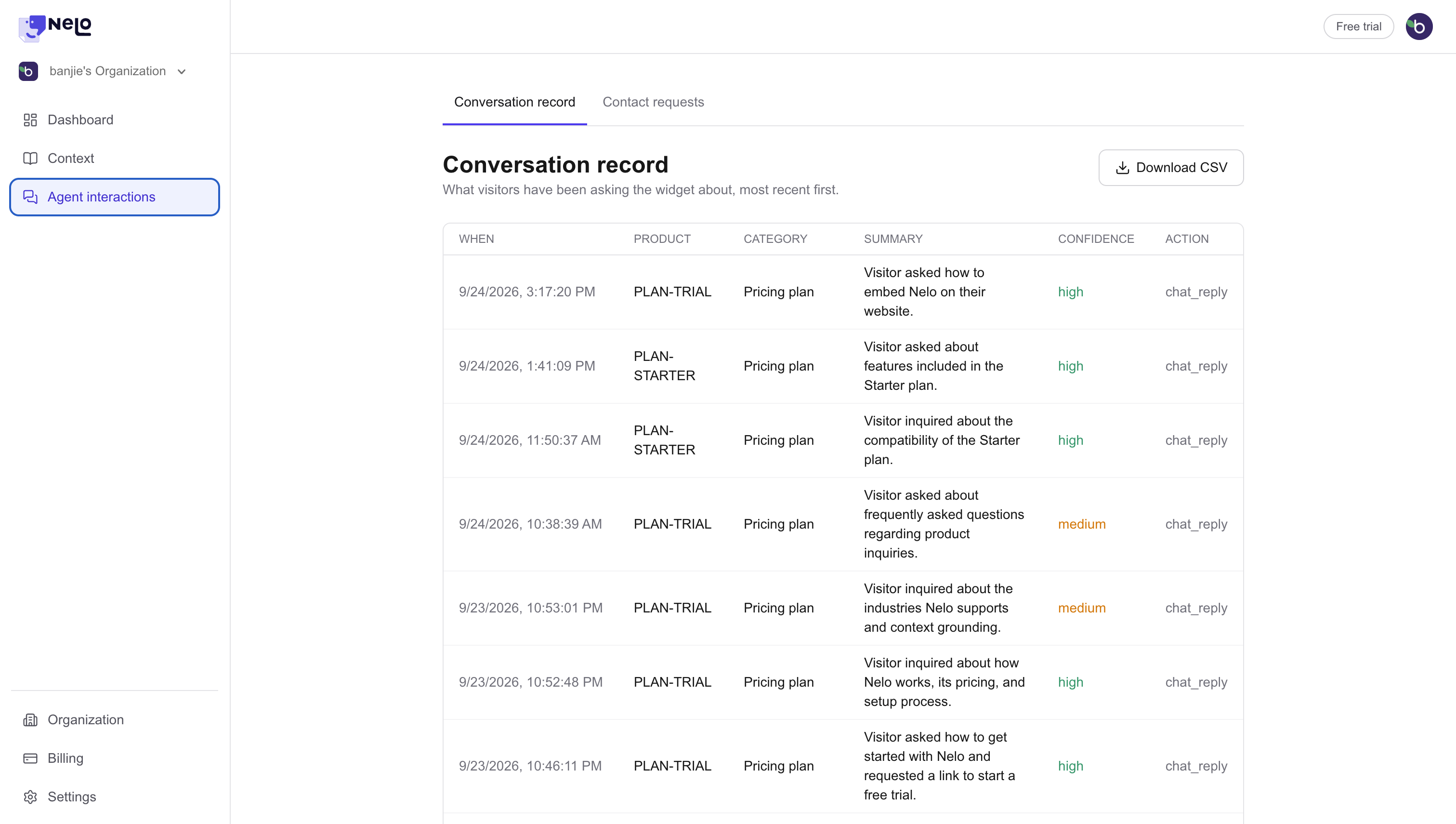
A dashboard for feeding and watching the AI
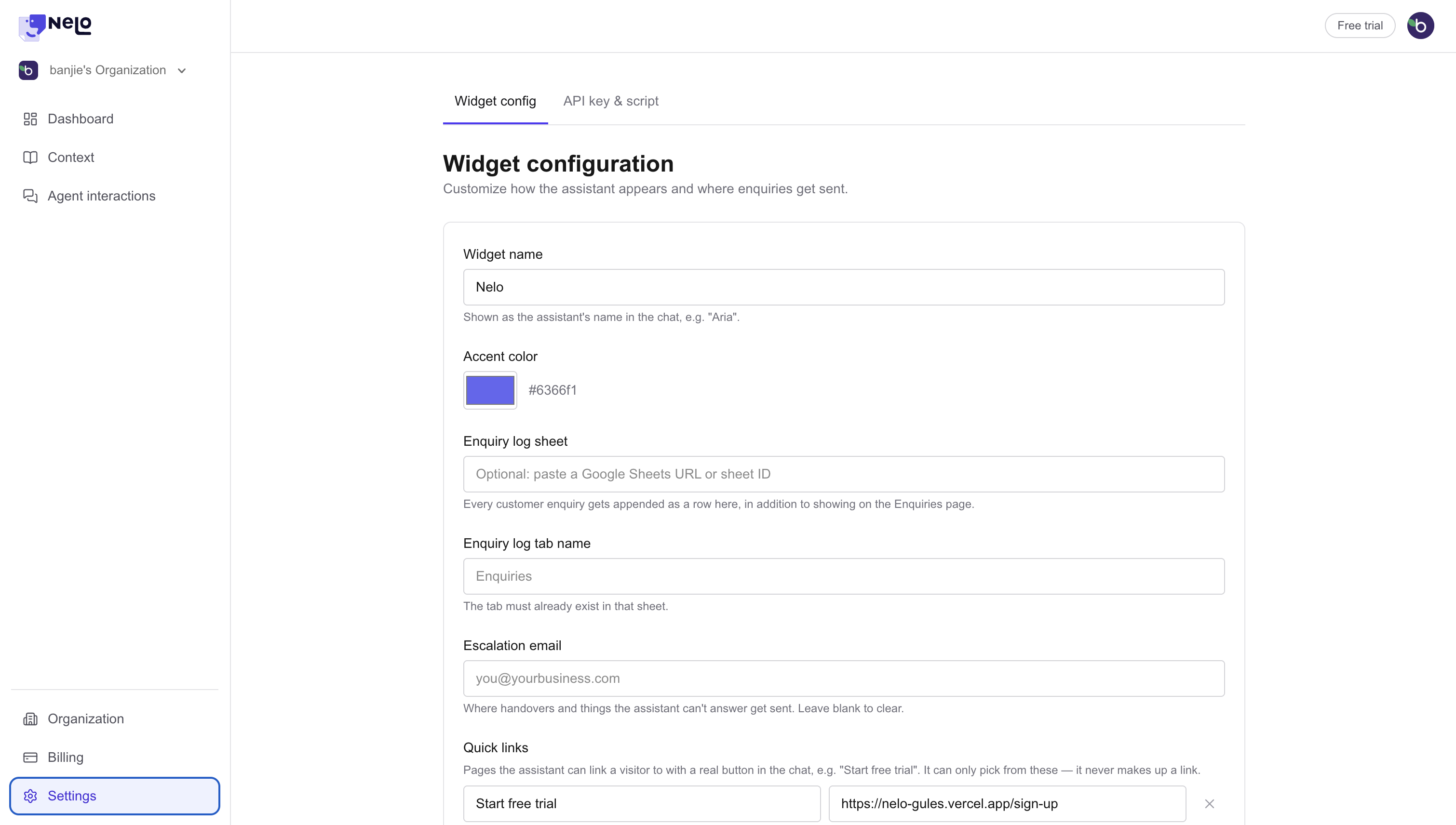
Everything an owner needs to teach their assistant something, see what it's actually been asked, and change how it looks and behaves — without a developer and without touching the widget's own code. Context holds the catalogue, the documents, and the editable instructions; Interactions shows real conversations, logged enquiries, and every lead the handover flow has captured; Settings covers the widget's name, color, the fixed set of links it's allowed to offer, and the embed key itself; Billing sits on top of Stripe.
A marketing site you can talk to
The homepage doesn't just describe what Nelo can do — a visitor can open the real widget from the page itself and ask it real questions about Nelo before ever signing up. That's the distribution mechanic from the problems above, turned into the product's own acquisition funnel: prove it by letting someone use it, not by writing more marketing copy about it.
The widget itself
A small, self-contained React app that runs inside every customer's iframe — the branded chat interface, the typing animation, the sample questions, and the tool-driven UI (link buttons, restock forms, lead-capture forms) a visitor actually sees and clicks. It's a separate build from the dashboard, deliberately: it can't depend on anything from the host page, has to render correctly above any stacking context a business's own site throws at it, and ships and iterates on its own.
A superadmin console across every account
Separate from the customer-facing dashboard entirely, gated to a small admin allowlist: search any tenant by customer email, business name, tenant ID, or API key; inspect their full config, Clerk org membership, and Stripe linkage; pull their raw embed key and recent enquiries and restock requests; and bulk-resync plan limits from Stripe across every account at once.
Build
No-code, not no engineering
I don't write the code by hand. I direct an AI coding agent the way a PM directs an engineering team — except the loop from “here's what should happen” to a reviewed, running change is minutes, not sprints.
The practice
Every part of Nelo — the data model, the Stripe integration, the widget's CSS, the copy in the system prompt — was produced by describing the intended behavior in plain language and reviewing the actual result: the real diff, then the real running app. Nothing shipped on “it compiles.” A typical change went through a type-check, a lint pass, and a production build before I'd even look at it in the browser — and then I'd click through the actual flow, submit the actual form, read the actual page, often against a live tenant's real data, not a mock.
Keeping the AI honest with tools, not prose
Anything the assistant does that changes state — showing a link button, opening a restock-alert or lead-capture form, logging a summary of the conversation — goes through a structured tool call, never free text. The model can only ever pick a link from the business's own configured list, because the tool's schema is built from exactly that list; there's no path for it to invent or misroute one. Forcing state changes through tools instead of prose is what turns “never show a link that isn't real” from a hope into a guarantee.
Billing, wired without writing Stripe code
I set up a full Stripe sandbox — products, two priced plans, a webhook, the CLI authentication — entirely through the same conversational process, then verified it by actually clicking “Get Starter” in the running app and watching the real webhook fire, rather than trusting the dashboard alone.
Timeline
Empty repo to priced product, one week
Sep 18
Scaffold & core loop
Multi-tenant data model, the chat API, and the embeddable widget — the smallest version of the whole product, working end to end.
Sep 18
Onboarding & tenancy
Clerk-based sign-up and organization creation, auto-provisioning a tenant the moment a business signs up.
Sep 18
Catalogue, config & enquiry log
In-app catalogue with CSV import/export, widget configuration, and an enquiry log with CSV export — dropped an early Google Sheets read-path once the in-app version could fully replace it.
Sep 18
Restock alerts, billing, real marketing site
The first lead-capture flow (restock subscriptions), Stripe billing wired end-to-end, and a real marketing homepage in place of the scaffold's placeholder.
Sep 19
Dashboard rebuilt around a rail nav
Restructured the dashboard's information architecture around a left rail, and added per-tenant agent instructions so owners could shape their assistant's tone directly.
Sep 20–23
Pricing, growth bets, conversational polish
The security and cost audit, the reprice to $19/$50, the personal-website vertical, CTA link buttons, the transcript scroll fix, a new logo, and the reply-pacing and paragraph-breaking rules.
Sep 24
Dogfooding fixes, same day
Watched a real external install, found and shipped the contextual-greeting fix, the skills-focused question tuning, and the generalized lead-capture flow — all found and closed within one day of watching someone actually use the product.
What holds it together
Three rules the whole system follows
Grounded, not generative
Every answer comes from the tenant's own catalogue, documents, and instructions — never invented, never assumed.
One script tag
No build step, no SDK, nothing that can touch a host page's own styles or scripts.
Actions through tools, not prose
Anything that changes state is a structured tool call, so a promised link or form is a guarantee, not a hope.
Outcomes
Where it stands
From an empty repository to a priced, multi-tenant product in roughly a week, with the same build-review-ship loop still running daily. The real test of the pricing and the personal-website bet is still ahead: getting it in front of people who aren't me.